When you try to install Windows via a bootable USB flash drive, you might unexpectedly encounter a dialog that seems to indicate that you need some kind of device driver to continue, with messages like these:
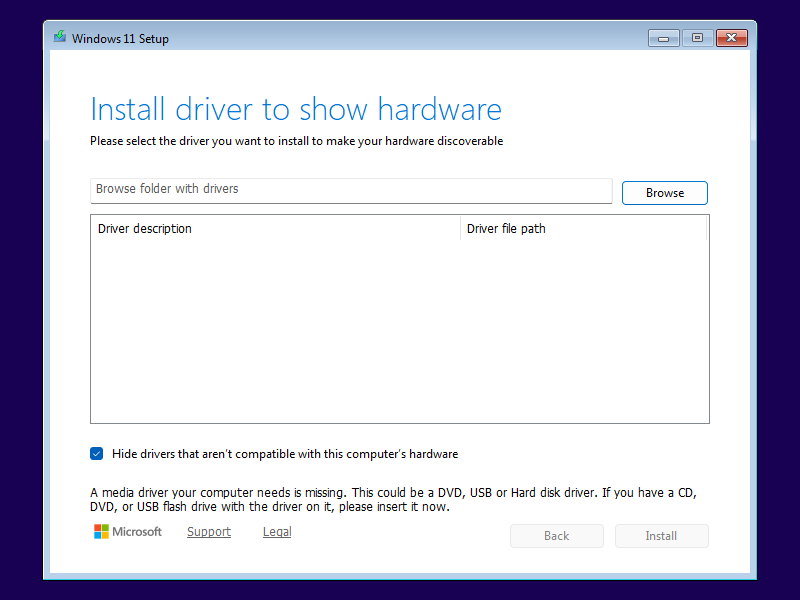
Install driver to show hardware
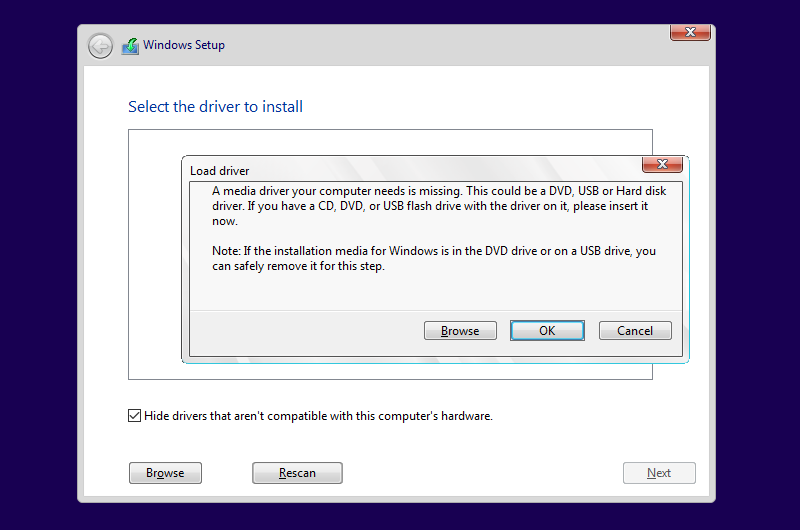
Select the driver to install
Please select the driver you want to install to make your hardware discoverable
A media driver your computer needs is missing. This could be a DVD, USB or Hard disk driver.
More often than not, this dialog is entirely misleading: If it appears on its own, without you having clicked the Load driver button first, the problem is not a missing device driver, but a bad USB flash drive.
With Windows 11 24H2, 25H2 or 26H2, this dialog will look like this:
Windows 10 and older versions of Windows 11 show a slightly different version of this dialog:
Windows Setup searches for a install.wim, install.esd or install.swm image file at the very beginning of the installation process, even before asking for language and keyboard settings. When your USB flash drive is unreliable, Windows Setup might be able to boot from it, but then fail to locate the image file. To verify this, press Shift+F10 to open a console window, then use notepad.exe to inspect the respective log file.
Type notepad.exe X:\$WINDOWS.~BT\ to view the log file used by ConX setup. (Note that the X:\$WINDOWS.~BT folder is hidden and will not appear in Notepad's file dialogs.) When Windows Setup can locate the image file, you will see these lines:
2026-07-27 16:19:28, Info                  MOUPG  Driver: Searching for install images...
2026-07-27 16:19:28, Info                  MOUPG  Driver: Module to hash is [X:\Sources\SetupHost.exe]
2026-07-27 16:19:28, Info                  MOUPG  Driver: Evaluating drive [D] as media location
2026-07-27 16:19:28, Info                  MOUPG  Driver: Media located at drive [D]
2026-07-27 16:19:28, Info                  MOUPG  Driver: Found install image at [D:\Sources\Install.wim]
2026-07-27 16:19:28, Info                  MOUPG  Driver: Found Media path at [D:]
However, when Windows Setup fails to locate the image file, you will see these lines instead:
2026-07-27 16:19:28, Info                  MOUPG  Driver: Searching for install images...
2026-07-27 16:19:28, Info                  MOUPG  Driver: Module to hash is [X:\Sources\SetupHost.exe]
2026-07-27 16:19:28, Info                  MOUPG  Driver: Evaluating drive [D] as media location
2026-07-27 16:19:28, Info                  MOUPG  Driver: Drive [D] did not contain [D:\Sources\SetupHost.exe] at expected location
2026-07-27 16:19:28, Info                  MOUPG  Driver: Found install image at [(null)]
2026-07-27 16:19:28, Info                  MOUPG  Driver: Found Media path at [(null)]
2026-07-27 16:19:28, Warning MOUPG Unable to find mediaType notepad.exe X:\ to view the log file used by legacy setup. The two cases are indicated by lines similar to these:
2026-07-27 16:19:28, Info                  IBS    Callback_WinPE_SetSourceMediaInfo_Unattend:Trying to determine source path.
2026-07-27 16:19:28, Info                  IBS    Callback_WinPE_SetSourceMediaInfo_Unattend:Media boot.
2026-07-27 16:19:28, Info       [0x0605af] IBS    Callback_WinPE_SetSourceMediaInfo:Sources folder path is [D:\Sources]
2026-07-27 16:19:28, Info       [0x0605b0] IBS    Callback_WinPE_SetSourceMediaInfo:Install source path is [D:\Sources]
2026-07-27 16:19:28, Info IBS Callback_WinPE_SetSourceMediaInfo_Unattend:Trying to determine source path.
2026-07-27 16:19:28, Info IBS Callback_WinPE_SetSourceMediaInfo_Unattend:Media boot.
2026-07-27 16:19:28, Warning [0x0605b1] IBS Callback_WinPE_SetSourceMediaInfo:Could not determine the source media path. GLE is [0x0]Try these steps to resolve the issue: